Editor

edit <file> opens a plain-text editor in its own tab:
edit src/main.ts
edit notes/new-idea.md      the path doesn't have to exist yet
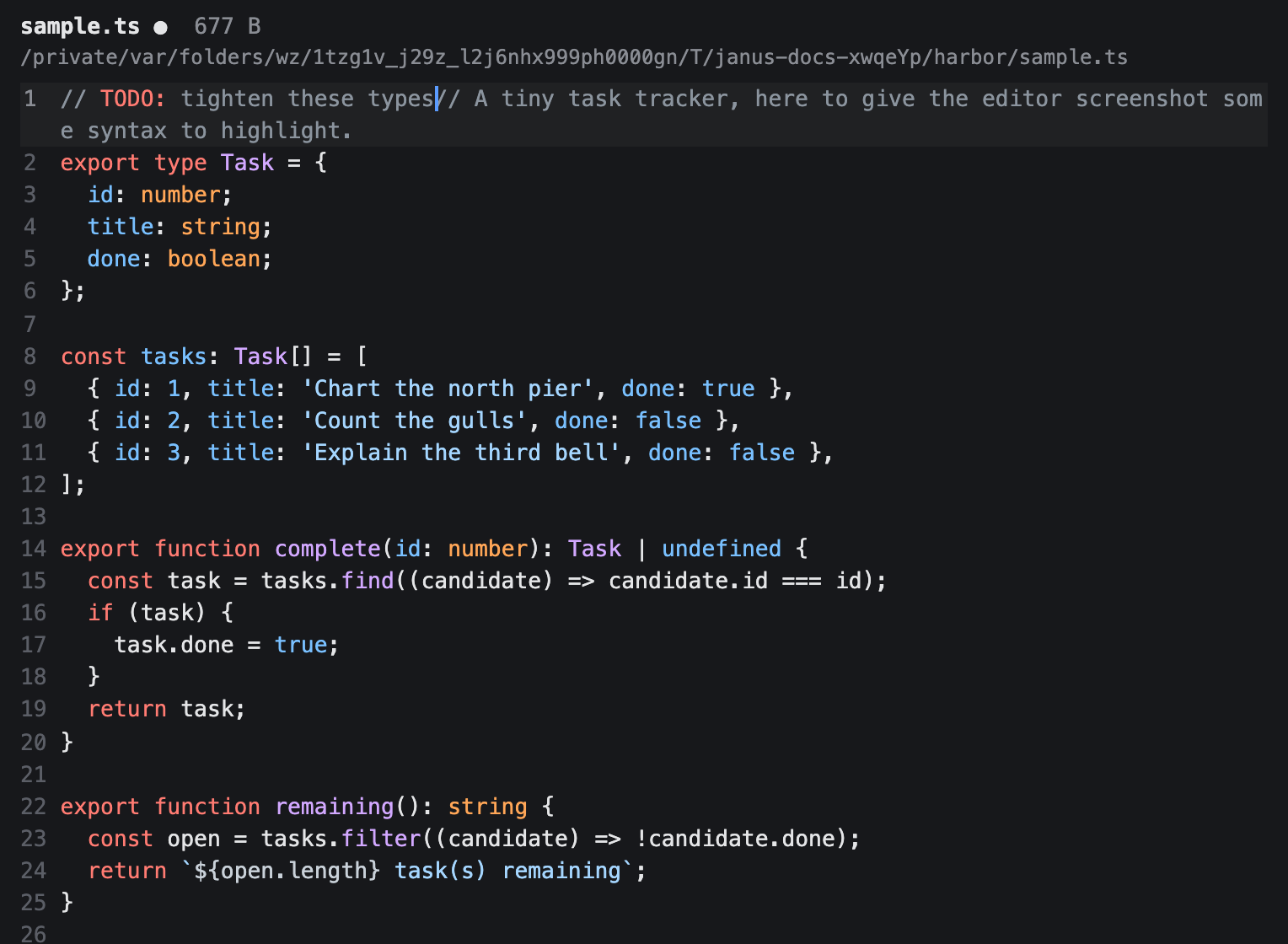
The tab shows the file's name, size, and location in a header, with the editable buffer below. Typing, arrow keys, Home/End, PageUp/PageDown, mouse clicks and selection, and paste all work as you'd expect. The save, connection, sync, and Split controls that are available stay grouped at the right edge of the header. The save button is enabled when you have unsaved changes and dimmed when the buffer is clean. Long sentences wrap between words when they reach the editor's edge. A single token wider than the editor can still break so it doesn't create horizontal scrolling.
You can also land in an editor by clicking a file.ts:42-style link in any transcript — the file opens with the cursor already on that line, centered in view — or from the file navigator with Shift+Enter on a file.
Focus stays in the buffer
Click anywhere in the editor body, including the empty space below the last line, and typing keeps working. Clicking on a line of text moves the cursor there; clicking on empty space doesn't move the cursor, but doesn't take focus away either.
Double-click a word to select it. Triple-click, or click the line number in the gutter, to select the whole line; dragging after either extends the selection a line at a time. Shift-click extends the selection from where it already starts.
A plain click on the header (the file name, size, or location) puts focus straight back in the buffer once you release the mouse, so your cursor and typing pick up right where they were. If you drag to select header text instead, for example to copy the file's path, focus stays in the header so the selection sticks.
Keyboard input
Typing, arrow keys, Home/End, PageUp/PageDown, and the usual editing keys all work as you'd expect, including holding a key down to repeat it. Shift with any arrow extends the selection, the same in both directions.
A long line wraps across several visual rows instead of scrolling horizontally. ↑/↓ (or Ctrl+P/Ctrl+N) move the cursor one visual row at a time, so crossing a wrapped line takes as many presses as it has rows on screen; once you reach the wrapped line's first or last row, the next press continues into the line above or below it.
Typing with an IME — composing characters from several keystrokes, as Japanese or Chinese input methods do — works normally: the editor waits for composition to finish before applying what you typed.
Comment and uncomment code
Press Cmd+/ to comment the lines your selection covers. With no selection, it comments the line under the caret. Press Cmd+/ again to remove the same comment, and use Cmd+Z to undo the whole change in one step.
JavaScript, TypeScript, and JSON use //. Ruby, shell scripts, Python, YAML, and plain text use #. Markdown and HTML wrap the selected lines in <!-- -->, while CSS uses /* */. A file with an unknown extension, or no extension, is left unchanged.
Line comments align at the least-indented selected line, so the block keeps its relative indentation. Blank lines in the selection are included. If the selection mixes commented and uncommented lines, the shortcut adds one comment marker to every line; the next press removes that one marker again.
Indent and outdent lines
Press Cmd+] to indent and Cmd+[ to outdent the selected lines by two spaces. With no selection, the shortcut acts on the caret's line. Tab also indents a selection that spans more than one line, and Shift+Tab outdents in every case. A single-line selection or bare caret still inserts a tab character when you press Tab.
Outdent removes up to two leading spaces from each line, so a line with only one leading space can still move left. Blank lines keep their exact contents. Leading tab characters become two spaces on lines the shortcut changes, but tabs inside the text are untouched. The behavior is the same for every file type, and one Cmd+Z undoes the whole block.
Edit repeated text at once
Put the caret inside a word and press Cmd+D to select it. Press Cmd+D again to add the next exact occurrence, then type once to replace every selection together. For example, two selected instances of oldName both become newName when you type the replacement.
Matching is case-sensitive and can find a selected fragment inside a longer word. It searches forward, wraps at the end of the file, and stops changing the selection once every occurrence is selected. You can also select text across several lines before pressing Cmd+D.
Each selection has its own caret. Typing, Backspace, Delete, and paste apply at every caret as one undoable edit. Copy and cut join the selected texts with newlines in document order. If pasted text has one line per selection, each caret receives its corresponding line; otherwise every caret receives the full pasted text.
Press Cmd+U to drop the most recently added selection. Press Escape to collapse all of them to the most recent one. A click in the buffer, Cmd+F, saving, or an automatic reload also returns to one caret. Switching tabs and back keeps the selections. Arrow keys and selection-extension keys move every caret independently, though vertical movement uses whole document lines when several carets are active.
These editing shortcuts are bundled with the editor. If one fails, its attempted change is discarded and every shortcut supplied by that editing feature stops responding for the rest of the browser session. The notifications feed reports Editor plugin "<plugin>" disabled: <reason>. Other editing features keep working, and reloading the page gives the failed one a fresh start.
Caret and scroll
The blinking caret marks where text will be inserted, and is only visible while the editor tab is active — switching away hides it.
Moving the cursor, whether by typing, arrow keys, a click, or paging, always scrolls it into view, and the whole line it lands on comes with it — never clipped at an edge, never left below the fold. Staying in place doesn't re-scroll. At the very top or bottom of the visible area, ↑/↓ still moves the cursor by exactly one visual row and scrolls by that same row to keep it in sight, rather than jumping to the start or end of the file. That means the view scrolls by screen rows, not whole lines: holding ↓ through a wrapped paragraph moves down it a row at a time instead of skipping the whole paragraph in one press.
Switching to another tab and back leaves your scroll position exactly where you left it, even if the cursor itself is out of view — only an actual cursor move while the tab is active pulls the view back to it.
Find a line
Press Cmd+F to search the file you're editing. A small input labeled Search buffer opens at the bottom of the tab:
Search buffer
 171  ### Syntax highlighting
 173  The editor colors text by its syntactic role…
 179  Highlighting composes with the caret and selection…
Type any fragment of the line you're after — the characters have to appear in order, but not next to each other, so synhi finds ### Syntax highlighting. The ten best-matching lines are listed with their line numbers, matched characters picked out.
↑/↓ move down the list and the buffer jumps to each line as you go, so you read the match in its surroundings rather than committing blind. There's nothing to confirm: Return does nothing because the jump already happened, and Escape closes the overlay leaving the cursor on the last line you looked at, ready to type. Clicking a row does the same jump.
A query that matches nothing shows No matching lines. Clearing it brings back the type to search hint.
The search runs over the buffer as it stands, so it finds edits you haven't saved. It only ever searches the file in front of you — not other tabs, not other files on disk — and it finds without replacing. Jumping doesn't count as an edit, so Cmd+Z still undoes your last real change. Switching tabs closes the overlay; Cmd+F opens a fresh, empty one.
Ctrl+F is not the same key here: it stays the Emacs-style "move the cursor right". In an agent tab, Cmd+F still opens that tab's own transcript search instead.
Saving

Click the save button or press Ctrl+S / Cmd+S to write the buffer to disk. On success a brief "Saved" flash appears in the header; on failure the error is shown there and the save button stays enabled. The save atomically replaces the file while keeping its existing permissions, so a failed write leaves the previous on-disk file and your unsaved editor state intact.
If the path didn't exist when you ran edit, the file shows a size of "unknown" and isn't created until your first save. Opening that same not-yet-existing path again doesn't focus the first tab the way opening an existing file would; each open gets its own independent, unsaved tab, since none of them has a real file to converge on yet. If you save one of those tabs without renaming it, and another tab already saved a file under that name in the meantime, your save doesn't overwrite it: it picks the next free name in the same folder instead, such as untitled.md becoming untitled-2.md, and updates the tab to match.
Renaming a tab renames the file
Unlike other tab kinds, editing an editor tab's label doesn't just set a display alias. It renames the file itself: type notes.txt and that becomes the file's actual name. For a file that hasn't been saved yet, this only updates where the first save will write to. For a file that already exists on disk, whether opened as an existing file or saved for the first time from a new one, renaming moves it to the new path right away.
Either way, the buffer is never reloaded: your unsaved content, cursor position, and undo history stay exactly as they were, and focus returns to the buffer once the rename finishes. Renaming the same file from the file navigator has the same effect on an editor tab that already has it open.
Closing with unsaved changes
Closing a dirty editor tab — × button, Cmd+W/Ctrl+W, or close — asks first: "Do you want to save changes to this file?" with Save (the default), Don't Save, and Cancel. Press y to save and close, n to close without saving, or Escape to keep editing. The dialog is modal; input elsewhere is blocked until you choose.
When the file changes outside the editor
Janissary watches the file behind an open editor tab for changes made by anything else, another process, a git checkout, another tool. If your buffer has no unsaved changes, the new content loads automatically and your cursor stays on the same line.
Your typing always wins if you start editing while Janissary is still reading an external change. The in-progress reload cannot replace your new text. If several external changes arrive close together, only the newest completed read can update a clean buffer.
If you do have unsaved changes, your edits are left alone. The next time you try to save, a dialog appears instead: "This file changed on disk. Overwrite it with your changes?" with Overwrite and Cancel. Overwrite writes your buffer over the external change; Cancel leaves your buffer as it is, still unsaved, and shows the same prompt again on your next save attempt.
As you type, the editor also keeps a transient, unsaved copy of your buffer synced to the server a moment after you stop, so a monitor watching the tab can see your in-progress edits without you having to save. That draft is never written to disk and never shown back in the editor; it's cleared the moment you do save.
Syntax highlighting

Markdown, JavaScript, TypeScript, and JSON files are colored by syntax, chosen by file extension; anything else renders as plain text. Highlighting keeps up with your edits without slowing typing down — including when several editor tabs are open on files of the same language, since each tab highlights on its own — and is skipped for very large buffers (over 10,000 lines or 1 MB) so they stay responsive.
One theme applies to every editor tab at once. Switch it with syntax theme <name>, or run bare syntax theme for a picker — the choice persists across restarts. See Application commands.
Ask a persona for a change
Press > at the very start of an empty line to open a request line, right there in the buffer, and ask an AI persona to make a change — for example > assistant tighten this paragraph. The persona's proposed edits preview inline for you to accept or decline. See Asking a persona for a change for the full syntax, keyboard shortcuts, and review flow.
Keeping a file synced with GitHub
Some files stay synced with their project's origin/master branch automatically: saving one commits and pushes the change for you, based on the paths listed in the app's configuration. There's no switch for this in the editor itself; a file syncs if its path is on that list, and doesn't if it isn't. See Git-synced files for how to configure which paths sync, why it's useful, and exactly what happens on save.
Lifecycle
Editor tabs are live views: they aren't restored by janus --relaunch, so save before quitting. The buffer, cursor, undo history, and scroll position do survive tab switches within a session.